Account & Setup
- Configure taxes, fees, service rates, printer & Wi‑Fi options.
- Set employee roles & permissions; view plan details & statements.
- Fine‑tune tips, closeout preferences, and app access.

One secure, real‑time view of sales, customers, employees, inventory, online orders, reports and apps — accessible from laptop, tablet, or phone.
Whether you’re running a café, retail shop, salon, food truck, or a professional service, the Clover Dashboard centralizes daily operations and gives you the insight to grow with confidence.
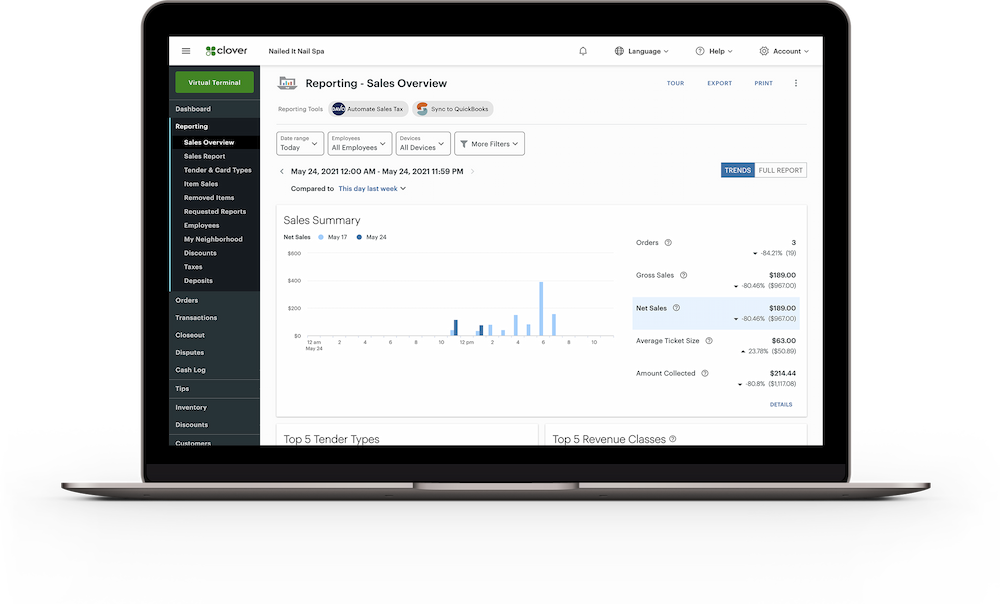
See today’s key numbers, hourly net revenue, top items, and trends across locations. Filter and export reports or sync with accounting tools to simplify tax prep.

Send professional invoices by email with a hosted checkout link. Customers pay securely by card, you both get confirmations, and every invoice is tracked in your Dashboard.

| Step | In the Dashboard | Outcome |
|---|---|---|
| Open | Check net revenue vs. last week; confirm staff shifts. | Spot issues early; optimize staffing. |
| Midday | Review top‑selling items and hourly trends. | Adjust promos or purchase orders. |
| Afternoon | Invoice a phone order via Virtual Terminal. | Get paid remotely and securely. |
| Close | Send auto closeout email; export reports. | Smoother accounting handoff. |
The Dashboard is available to Clover merchants and works with your Clover account. Log in from any browser to view reports, manage items, settings, and more.
Yes — the Virtual Terminal lets you accept card‑not‑present transactions, issue refunds, send invoices, save cards on file, and set up recurring payments.
No — invoicing is included with Virtual Terminal and uses your Clover account. Payments can clear as quickly as within a day depending on processor timelines.
Our team is here to answer anything and help you get started.
Get in Touch